Master the Tableau Data Model & Relationships featuring Kirk Munroe
Kirk Munroe and I take you through the Tableau data model end to end, from your first relationship to multi-fact analysis.
- Relationships form a logical model you can build without writing SQL, while joins and unions sit at the physical layer inside a logical table and combine before any question is asked.
- Only convert a relationship to a physical join when both tables share the same number of rows at the same grain, so Tableau doesn't needlessly join at runtime.
- Leave the relationship performance options at default unless you hit performance issues, as overriding Tableau's heuristics restricts the questions you can answer.
- Layout is just a visual representation, but with more than one fact table you should make each fact table a base table to use multi-fact relationships and compare unrelated data through shared dimensions.
- Use COUNT of rows from a table rather than COUNTD on a dimension to confirm uniqueness and get the same answer with a far lighter calculation.
- Where the data model lives1:08
- Relationships and the logical model2:46
- Know your data first6:05
- Understanding base tables7:47
- Relating on multiple fields9:46
- Unioning the sales data11:22
- Logical versus physical tables14:45
- Joins and join calculations17:14
- Naming tables and sources22:36
- Finishing the model23:33
- Relationship performance options25:00
- Layout, star schemas and base tables29:51
0:00Hey Tim here.
0:01Today we have something special.
0:03This video is going to be the data model masterclass and I couldn't think of anyone better to join me other than Kirk Monroe himself.
0:10Kirk, how are you doing?
0:11I'm doing great.
0:12Thanks for having me.
0:14Are you ready to blow our minds with the data model?
0:16Yes.
0:17This is like three years culmination of explaining this, and I think I've got it down right
0:22Do you want to do the honest cook?
0:23Absolutely.
0:24Let's get stuck in.
0:26Okay, so the plan for this video is to make sure that by the end of the video, you know everything you need to know to confidently use
0:34the data model.
0:35You'll find timestamps below in the description but also across this entire timeline.
0:40So if there's a bit that you know a lot about you can jump ahead.
0:43But it also is a great way of revisiting sections if you need to.
0:46I think that will be necessary for this one.
0:48So make sure you pay attention to the timestamps
0:51The other thing I'm going to ask you to do is if you find this video useful, please subscribe then, share it with your colleagues, your friend, and the community at large.
0:58We're really trying to build a useful resource for the whole community.
1:01So we really value your feedback
1:03And if you love it, sharing is a great way to let us know that you love it.
1:06Alright, let's do this.
1:07Okay, so Kirk, we're here inside of Tableau.
1:11And I think the first thing we have to do is explain what the data model is by maybe showing people like where it happens.
1:19Where does the data modeling happen, right?
1:21So to do this, I'm going to use everyone's favorite data set, not superstore, bookshop data.
1:29I'll put a link in the description so you can download this from the Tableau website.
1:33Go ahead and grab it yourself.
1:35When you when you get the file from Tableau, it comes in in sort of two two variants.
1:40There's the main Bookshop data store file, which is an Excel file.
1:43That's what I'm going to select here, select open, and we'll immediately go into the connection window.
1:50And Kirk, I think it's fair to say that this is where the magic starts, right?
1:54Uh the is
1:55I is there anything I should know that's really cool about this place before we get started?
2:00What's cool about this place, I think, is it's the same as working on a sheet.
2:05And that the tableau makes it very intuitive.
2:07So you can drag and drop, but you can also double click your way through this and if
2:12the field names match different tables, it'll double it'll double click build out the data model for you as long as the field names have that you're gonna relate on have to be exactly the same for that to work.
2:23But you can even double click your way through it if you want.
2:26Oh yeah, that worked.
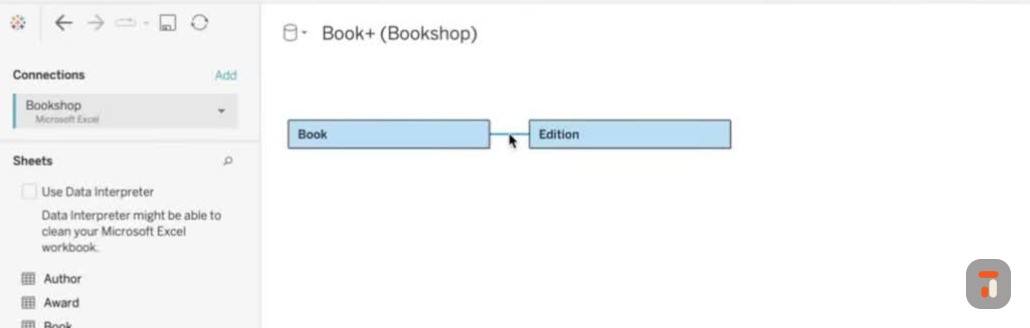
2:27So um what I did there is I double clicked book and I double clicked edition.
2:31The first time I double clicked, I was clicking somewhere off screen, so it didn't work.
2:34I was like, why is this not working, Kirk?
2:36You you're lying to me.
2:38But no, uh double-click book, double-click edition, and it immediately creates
2:43a connection between the two.
2:46So let let's explain what this connection is.
2:49Um this is it's it's saying it's called a relationship with related fields.
2:53Is this the data model?
2:54Is this what is this what people should know is the data model?
2:57Yeah, you are you now have a data model.
3:00Uh and it would be we would call this a logical data model
3:05Um, and the reason for that is because you can build this data model without understanding SQL at all, basically be the way to think about it.
3:14Okay, okay.
3:15And so right now I have a connection between my uh book information.
3:21So if we click on books, we'll see that it shows us the list of books here
3:25Book ID, title, author ID.
3:27We kind of get it in two ways.
3:28We get the metadata and we get the tabular sort of preview.
3:32It's showing 58 rows.
3:33I think that's all that the data there is.
3:35Typically, Tableau shows like
3:36Ten thousand.
3:38I think.
3:38Yeah.
3:38Or hundreds.
3:39Or is it a thousand?
3:40I I don't know.
3:41Like it's one of those things where I never know which it is because sometimes it is ten thousand and sometimes it's a thousand.
3:46And I can never know.
3:47Like, why is it changing?
3:48But anyway
3:49We see the preview, this is great.
3:51I click on addition, it shows me the different um pieces of information.
3:56So the question I've never understood is why can't I see what they're doing together here?
4:02Um because they aren't doing anything together here and to you on a sheet tell them to do something together.
4:07Right.
4:08So they're literally doing nothing together here.
4:10That is two independent database tables, or physical tables effectively, that all you've told them is how what what's common between those tables.
4:21I see.
4:21So it's a bit like I've got my my ingredients for a recipe.
4:25But I have not started cooking yet.
4:27I've not made anything, so they are just distinct items on my kitchen table.
4:32Perfect.
4:32Okay, so
4:33This is interesting.
4:34So the books the books at date is actually quite useful.
4:37If you're not familiar with Tableau, there's this sort of very, very subtle icon that appears.
4:42Let me just draw where it's going to be.
4:43It's going to be in this sort of red area.
4:45Whenever I hover over a table, it's going to show you this option.
4:48So you can see here, as I hover over each of these, I see this little icon.
4:52If I go over to let's say book and I click on it, I get a little preview of the dataset.
4:56So this is a
4:57a modal window that gives you a bit of insight into the actual data set.
5:01And so if we just look at this data very briefly, we've got checkouts, we get a book ID.
5:06the month and the number of checkouts.
5:08I think this is maybe related to library information.
5:11And we'll come back to that in a second.
5:13We've also got the awards that have been won.
5:16We get the award name, the title
5:19Um I think this is belonging to the book title specifically and then the year that that was won as a uh let's let's call this like a
5:28Um a double.
5:29I keep thinking an Ultix term, doubles and integers, but numerical field, if that makes sense.
5:34You can tell I spent too much time in Altrix.
5:37And then you've got things like sales.
5:42Um spread out here.
5:43So essentially each file is just going to be a quarter of sales.
5:46But
5:46Um because these are all in the same structure, I think I can start to sort of form an assessment of what I'm going to do to build this data model a little bit.
5:55So
5:56Um let me just look at these to just confirm they're the same uh columns.
6:00They are.
6:00So we start to we start to understand sort of what our data looks like.
6:04And I think
6:05Kirk, it's fair to say that it's it's probably a good thing to just scan your data first before you plan how you're going to build your data model.
6:13Is that like a fair
6:14thing to do or should you just start with your analysis and then come back and and do it?
6:18Like people have sort of different philosophies.
6:20Yeah, no I think it's worth looking first.
6:22I say to people all the time, um you don't need to understand SQL to be good at
6:27Tableau, but you need to understand your data really well to be a good analyst.
6:31So whether it's Tableau or not, so what jumps off the page here pretty quickly is it's intuitive to go
6:38Well uh books must go to sales, but I'm sure you'll get to this.
6:42But it's actually editions to sell, not books that sell.
6:45So you kinda need to know that going in.
6:48Um
6:49Again, you could figure it out pretty quickly here.
6:51The double clicking will actually inform you because if you double click and it can't make the connection, it'll throw it in as a base table.
6:59But like that there are ratings related to the right.
7:03It would just hang it as a base table because it wouldn't know what to do with it, and then you could go, I better explore this.
7:09Even when you double click, it's good to check to make sure Tableau didn't get it wrong.
7:14So what I'm going to do quickly just to test your theory is if I click on this drop-down and I select remove, that removes the model.
7:21So now what I know I need to do is connect to
7:25uh a publisher data set and the publisher if we have a look at it um is only going to connect to our books via a common fill that they both have with the edition table so if I just look at this you'll see here
7:38Uh the publisher ID is going to be the common fill between the edition table and this table, and the edition will bring the books with it.
7:45So if I double click
7:47on Publisher, you're right.
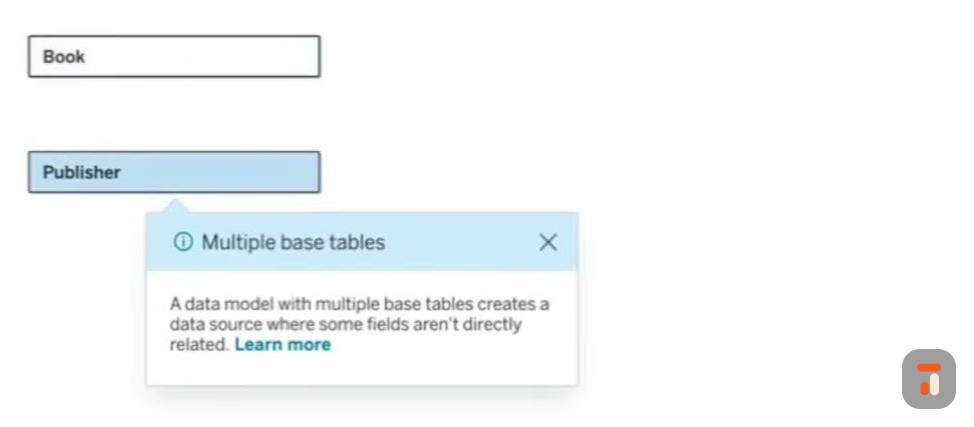
7:49It drops it in as a base table and actually it gives us a little um little icon.
7:53So these are sort of all bits of information.
7:56Are you able to maybe just explain what's going on here?
7:58What is it trying to tell me right out of the gate?
8:01Um yeah, so effectively what it tells you is we'll get back to what base tables are f are good for, but what it's basically telling you is I have to put this thing as a base table, at least right now, because I have no tableau saying.
8:15'Cause I have no idea to know how to relate this publisher to book.
8:19I don't know I can't do it.
8:21So I have to throw it here, right?
8:24Um yeah, so it and so therefore what it's assuming here, which in this case isn't a great assumption, but that because they can't relate it
8:32that you must have other things that relate those together and you're gonna tell it how to relate those things.
8:37Right, I see, I see, I see.
8:38So it's just giving me a warning.
8:40But we know this was wrong.
8:41We kind of we kind of uh sort of tested and you get this little alert as well.
8:45I think this alert, when you click on it.
8:47It tells you, hey, you have two unrelated tables, right?
8:51Um and there's a little option.
8:53But maybe let's come back to this uh setting a little later because I think it makes sense a little later on.
8:58But for now, let's let's sort of
9:00Let's stop going off track.
9:01Let me stop sort of sapping you of all your knowledge and let's let's build out this model in earnest.
9:06And I'm gonna try and do this um as a as a data analyst would.
9:09I know a little bit about this data set.
9:11I know a little bit about how this model should look like.
9:13I've also got it off screen.
9:14But nonetheless, uh, we're gonna build it out.
9:17I'm gonna show you all the different things as we go along.
9:19So the thing I did last time is I double-clicked edition and it created this relationship for us.
9:24When you uh hover over this, you see the relationships in book and edition, book ID equals book ID.
9:30I don't need to change that, but if I wanted to, all I'd need to do is just come down here on the bottom left
9:36and I'd be able to sort of change that myself.
9:39I'll come back to the options in a second because I think it's important just to build this out, then we can sort of step into it a little bit more.
9:45The next thing was double clicking publisher.
9:48Previously this didn't work because we didn't have the edition table.
9:51But you can see that there we have it.
9:53Um I keep clicking on it, but it actually works on hover.
9:56I need to I need to get that muscle memory out of me.
9:58I just double click everything in Tableau.
10:01The only thing I was going to say is of course you can connect on multiple fields if you have to connect on two.
10:07Yes.
10:08Or do a joint and they don't have to equal.
10:10You'll notice you have an operator there that, you know
10:12If you were doing dates, you could say less than date and effectively pass a filter and the relationship too.
10:18So here are all the operators, but these operators are specifically because of the dimensions I'm using.
10:24If if if
10:25If um if I was doing relationships in a slightly different way, the operator would change to match the data type.
10:30I think that's like a a fair assumption to make.
10:33And then you've also got the ability to add more fields.
10:35So I could relate on multiple
10:38uh let's say levels of granularity within two different tables.
10:42So maybe I need both a publisher ID and for whatever uh reason uh another contextual piece of information.
10:49Is there a suggestion on how many how many make sense?
10:53Like
10:53When does it get ridiculous?
10:54Like because I know I can just keep adding this.
10:57Well sorry.
11:02So it's really only when you have
11:05Things like a compound like two fields and you don't want to do a compound field calculation, like say you had to match on first name and last name or something.
11:14You have to match on both of them have to be true to match for me.
11:17Okay, perfect, perfect.
11:18Okay
11:19So that's pretty good.
11:20Let's let's keep pushing through.
11:22So we've got our books edition publishers.
11:24I think it's time that we show people how we can bring our sales data in.
11:28And there's a couple of ways to do this.
11:30I do this probably the most unrealistic way, which is um because
11:34If I just double-click this and I click sales, you'll see that it does make the correct relationship between the edition and uh the sales, and that's absolutely fine.
11:42But then you probably wonder, well, how do I bring the other two?
11:46Um I always like to anchor on the initial table in a in a in a union and that's what we're about to do here.
11:52So now that I've got those two there, I can
11:54Hold shift and select to these three and then I can drag them.
11:58And if I just put them on top, you'll see the tableau has this orange
12:02uh sort of alert to say, hey, I'm gonna union this and by the way, I'm gonna union them underneath Cells Q1.
12:07And as soon as I drop that in, it thinks about it and then it changes that.
12:12little icon to um uh sales q1.
12:15So this has some new terminology here.
12:18I can see it saying double click this logical table to see its physical table.
12:22Can you explain what a physical and logical table is?
12:25Because I've never understood like why why they use these terms if that makes sense.
12:29Um
12:30Yeah, if I could quickly, there's two other ways to do that union.
12:33You could highlight them all and just drag them all on.
12:35If you could have highlighted all four, dragged them on, it would have automatically done a union.
12:39Right.
12:39So I I really like so if I do this and I just drop them there, does it also figure out the relationship?
12:45It does.
12:46Wow.
12:46So that's amazing.
12:47That's cool.
12:48That's really cool.
12:48And the th the third way, which I almost always do, is I right click on it in edit union.
12:56Or drag one of them on.
12:57Or you could have done what you just did.
12:58It doesn't matter.
12:59And then you can go straight to edit union.
13:02If you like well yeah, convert to union first and then edit union.
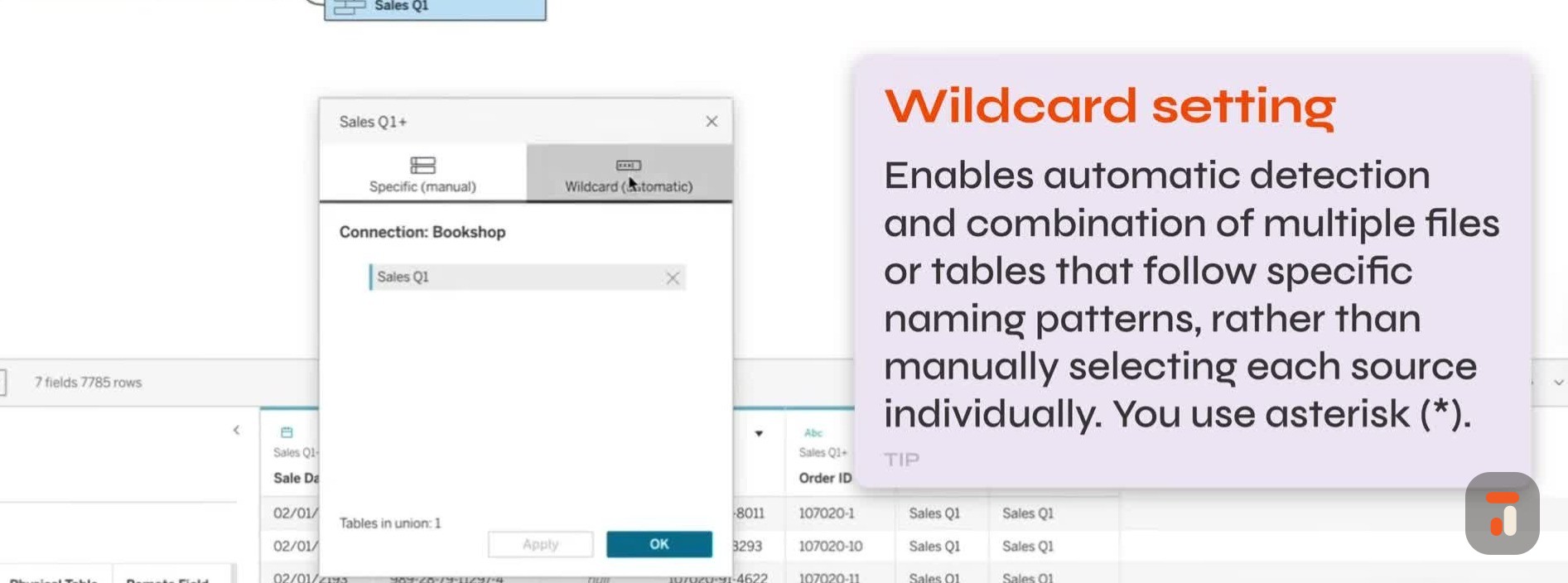
13:08And then I go to wildcard here all the time.
13:11I would go like star sales star and then if
13:14you know, another quarter sales came in, you would have to touch your data model.
13:18It would just keep adding or whatever.
13:20So usually a wild card union.
13:24Why do I never do this?
13:25I think it's a bit scary if I'm honest.
13:27I'm not gonna lie.
13:30I don't like doing things in places where I can't see.
13:33So maybe because I'm like a visual a visual person.
13:36So you're suggesting I could do this.
13:38So uh star uh sales.
13:42I think it's probably case sensitive, I don't know.
13:44Capital sales, yeah.
13:46And then we'll start again.
13:49Um
13:50Just go star.
13:51And then assuming you know that it's gonna that and then you have to know that when people drop it, they always start it with sales.
14:00If I click apply and click OK
14:02It's a very good idea.
14:05Yeah, that's kind of worked.
14:07So um let me just make this like 10,000 rows.
14:11Let's test this properly.
14:13Um that's I don't know how many cells were in our first one.
14:16Probably Yeah, there you go.
14:17Sales key T's worked.
14:21Okay, it says so right here.
14:23Uh I'm being really slow.
14:24So it says so right there.
14:26And I'm able to see that.
14:27And then of course um this little drop down is just another way to navigate this
14:32top area, right?
14:33So this little uh lets me look at the logical tables and the relationship.
14:37Sales key one is not a logical table.
14:39It's a physical table.
14:41Um so we'll we'll go on there.
14:42But you hadn't explained what a physical table is.
14:45Okay, sorry, back to the question.
14:47Um yeah.
14:48So uh
14:49I I should clarify this a little bit.
14:51I find Tableau confuses us a little bit because they call them logical tables and physical tables.
14:56Right.
14:56Where where the term actually comes from in the data modeling world
14:59is there's logical models and there's physical models.
15:03And what's really neat about traditionally what a logical model would be would be exactly what you're looking at, where you would just say some business analyst or data analyst who's not a data engineer
15:13Would could just draw tables out and then say this is how they relate.
15:17And then you would hand those to a data engineer, and the data engineer would write a whole bunch of SQL and cast fields and
15:24Do all that sort of stuff, create joins, right?
15:26What's neat about relationships um is that if a logical table comes to life, you don't need the data engineer.
15:33Tableau will dynamically create what it needs to create at runtime.
15:37Now
15:38But Tableau brought it down a level and they called them logical tables and physical tables.
15:41Like a table is a physical table.
15:43But that but just think about it.
15:44It means it's a table in a logical model, basically.
15:48So
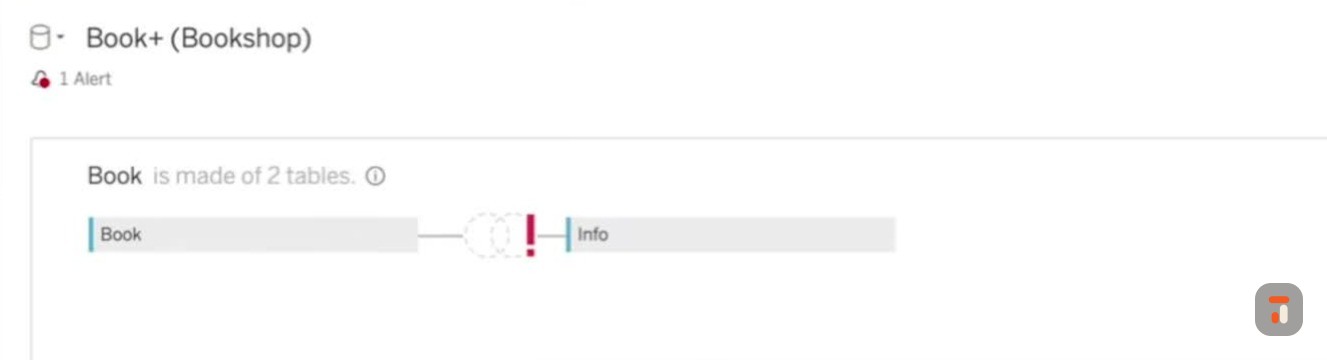
15:49If you open this up, so literally click on it and open, right?
15:53You could do you and now you can create joins in here at the physical layer, kind of like what a data engineer would do or what Teble used to force you to do before 2020.
16:05Which is create joins at the physical layer.
16:07In this case, Tableau first always considers a union um uh physical layer because there's no such thing as uh is a logical
16:17union.
16:18It doesn't make sense.
16:19And then for for people who don't know that, difference between a union and a join is a join adds columns to an existing table.
16:27And a
16:28union add rows to a table.
16:30So a good union won't shouldn't add columns, really.
16:32It's just adding more rows under the same columns.
16:35But it's it's a physic but every union's physical because
16:40Um it wouldn't make sense to do something with them at runtime.
16:42It makes sense to always pre-bring all those rows in is effectively what the reason why
16:47Okay, good.
16:48So there's a lot of like say etymology to borrow a a a phrase from linguistics, right?
16:54Where um all all of these uh different, let's say
16:58uh bits of heritage from the actual data modeling world are being sort of co-opted into this tableau world to kind of make sense of
17:06how we work with our data.
17:08Um and I think this this this this this is a good way to think about it because actually
17:13We have one more challenge with our book data, which is that in it we need to go and add some information about books.
17:20And so in the in the data model that Tableau sort of showcased
17:25They they talk about putting the information about the book as a join inside of the book logical table.
17:33So let's double-click inside of the book.
17:36logical and table and then we'll see the physical book table and what we need to do in here is do a join to bring in the information and this is also a a little bit more of a nuanced join so I'll try and
17:48do it and explain it as I go along.
17:50So if I bring in my information table and I drop it in, you'll see what I would call the traditional join interface, right?
17:56For Tableau, where we have
17:58the option between four different types of join and on the left hand side I am going to use my book ID but on the right I have a slight problem because um if I if I actually preview this data let's just just just close this quickly I can do that whilst it's open.
18:12Um we see that the book ID is actually in two parts.
18:16We have book ID one and book ID two, and we need to bring them together.
18:20And typically
18:21This is kind of annoying because I think way back when you would have had to do some SQL to bring these two together, then come in here and set it up.
18:29But actually, you can just go in here inside of the calculation.
18:32and say look book ID equals and then at the very bottom in the tiniest of tiniest text, I don't know why it's so small.
18:40It should be bigger, right?
18:42Yeah.
18:43Create a joint calculation.
18:44So in here I can do book ID one plus book ID two.
18:51and hit apply and then Tableau will say okay I get what you're trying to do and you'll notice um the window changed here so in my preview you can see it started to bring the dates together
19:02If I hit OK, you can see that it's actually doing that calculation in that little drop-down.
19:08You can't see it in here.
19:10You just get this little option again to say edit join calculation, then it comes back up.
19:14But that's now working and then the the the critical thing here is choosing your joint.
19:18So I guess here I have to be careful about my join because
19:23At this point, I'm being specific about the joints.
19:25So if I want to keep all my books, even if they don't want, don't have information
19:30I need to use their left join so we don't lose any book information from this particular outcome.
19:36Is that is that a fair summary of that?
19:39Yes, that's a that's a fair summary.
19:41Uh the only thing I would add to this is a couple things to add.
19:44Now this book
19:47is you're at the physical table layer because now your book at the logical table now has two tables that are joined together and it into Tableau they're going to look like one.
19:58table, hence one logical table, even though there's two physical tables inside that table.
20:04The last thing I would add is I would only do a jo
20:07Well, there's always exceptions.
20:10There would always be exceptions.
20:12I would only do this joint if there were the same number of rows in both tables.
20:18Oh interesting.
20:19Why is that
20:21Because um because otherwise the re the great the great reason you would use relationships
20:29is because you might not know what questions you want to ask and you don't want to explode your data.
20:34So when you do this join, you're joining the data before you ask any question in Tableau.
20:40But since
20:41Since you're not exploding the data model or creating any kind of problems with like um levels of detail because you're messing up your you know, they're at the same level.
20:50Basically, there's one row.
20:52in every um uh there's one row in info for every book and vice versa.
20:57Then why make Tableau join those two tables together at runtime?
21:01You might as well pre-join it ahead of time.
21:04Right.
21:04So that's the only time I would do one of these join.
21:07I see.
21:07I see.
21:08And so for this diagram, they've they've they've basically just done it for like demo purposes, but in
21:13i in real terms we would we would we would do this outside.
21:16Now can you do that?
21:17No, I I might join this like I said in this case, sorry, because
21:21Um because there are the same number of rows.
21:23I think if you look, there's fifty-eight rows in both.
21:25Fifty-eight rows in Oh yeah, that's right.
21:27Yeah.
21:27Yeah, yeah, yeah.
21:28So you might as well you might as well join them to prevent Tableau from having to join them all the time at runtime that you asked for the question.
21:35Yeah.
21:36There's 58 rows, six fields, and then books has the same information there.
21:4058 rows, three fields.
21:42Perfect.
21:43Okay.
21:44So now that we've built this, um
21:48I've always wondered, can I rename this logical uh um uh table if that makes sense?
21:55So now that I it's because it's it's book and info.
21:57So yeah when I when I go back here, can I rename
22:01Yeah, no, you can rename it here.
22:02And you also see that it's got an indicator showing you can rename it.
22:10book and info um in there.
22:13I wish it had like um I guess it does have an indicator and it's it's trying to avoid redundancy because
22:20It's showing you the join icon, it's showing you the union icon.
22:23So is it fair to say that anytime you see an icon before the name of the logical table, it's a
22:28There are physical tables being brought together inside of that logical square, right?
22:33Perfect way to describe it.
22:35Yeah, perfect.
22:36Okay, good.
22:36So we've got our book in the first time.
22:38The other quick thing on this that's I always try to do oh sorry is um is rename the data source the same thing too.
22:44It gives it a terrible name based on whatever field you drop on first, which is terrible.
22:51Yeah.
22:52So we'll call this uh bookshop data model.
22:59Right.
22:59And this is actually super important because if you go ahead and you skip right past this and you publish that up
23:04When you look at your metadata, it's gonna have tons of things that just say book plus shop, book plus because you've always dragged in book as your first one.
23:11When in actual fact the models are doing different things, right?
23:14So that's a good
23:15That's a good catch.
23:16So yeah, get used to naming your models.
23:18You'll find, Kirk, that I don't name anything.
23:20I I I go through the whole project, then I start renaming only the things that present themselves to users.
23:26I often forget it.
23:27I just thought it was a good point to bring it up when you're talking about remaining.
23:30It's a good one.
23:31It's a good one.
23:32Good.
23:32Alright.
23:32So I think we're nearly there.
23:34Let me let me let me let me see if we can um do this.
23:37So I've got my books, I've got my
23:39Editions, my publishers and sales.
23:41Um author information is pretty important.
23:44So let me just sort of take your tip here and double-click it and I'll see the author ID maps.
23:49So that's works really nicely.
23:50Um the other bit the other bits of information I need to bring on are the awards.
23:55Again, it's just sort of mapping this out.
23:57Um the other thing are checkouts.
24:00I I can't remember what checkouts are, so checkout month, number of checkouts.
24:04Okay, so this is like
24:06I think this is like a library dataset, really.
24:08That's why it has checkouts.
24:09So let's just double-click that and then we'll get that relationship.
24:12And each time it's picking the right thing.
24:14I think this data set's set up quite smart.
24:17because it's finding uh the right IDs.
24:20If I had different IDs that I could use this relationship with, what I would be able to do is then just go click on these and change them manually.
24:28So
24:28I urge people to check those, even though we're clicking through this very quickly.
24:32Um sometimes it's just worth checking these over and making sure it's doing what you expect them to do.
24:37Okay.
24:38And then uh ratings.
24:40And I think series is the last one.
24:43And I think we're pretty much there.
24:44I think that is everything that should be in that model.
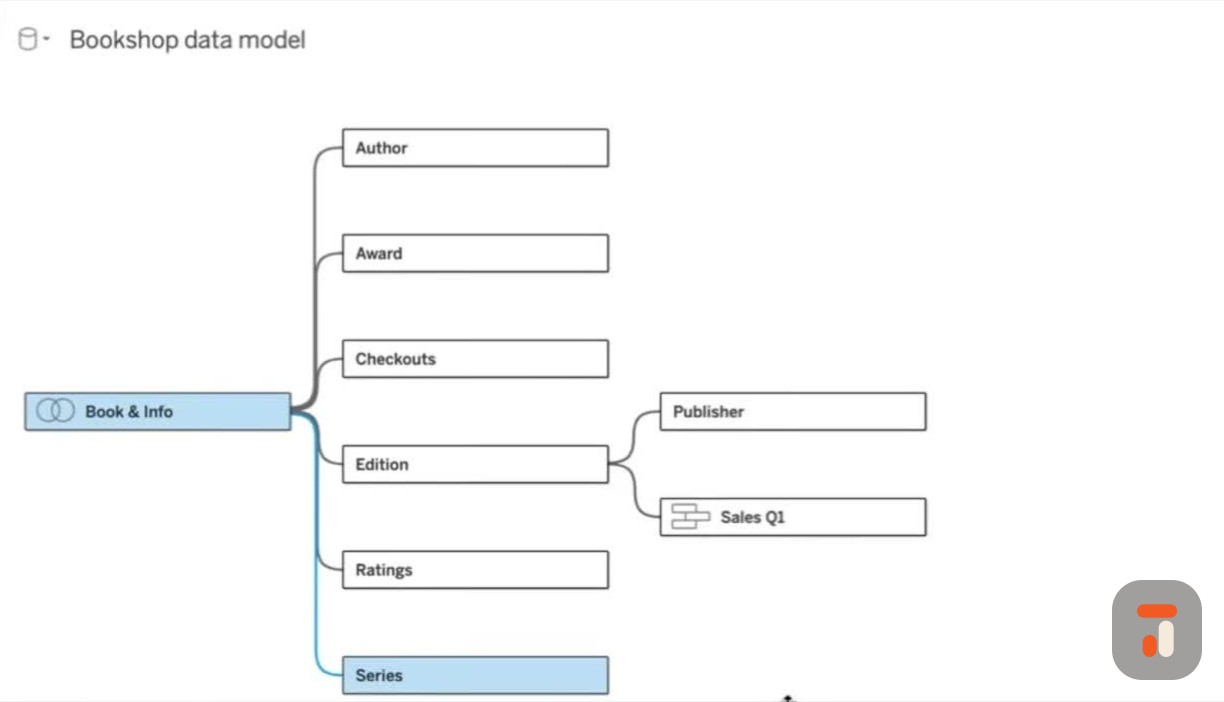
24:48Okay, so a pretty complicated, actually simple model.
24:53Books is our booking information is our b is our base table.
24:57Then we've got a series of other information.
24:59Now, when I hover over these and I click on them, we get a little bit of contextual information.
25:07The next thing I wanted to do is just ask a little bit more about the specific settings.
25:11So if I just bring this up here and I move this up and let me just click on this sort of line
25:18you'll see that Tableau does two things.
25:20When you click on the line it highlights the related the the tables, the the the logical tables that are linked with this connection.
25:28So you can see that that's highlighted book and phone checkouts
25:31If I do that again, you'll see it grays them out.
25:34But one thing I wanted to ask is a little bit more about these performance options.
25:38How often do you change these?
25:40Because I uh truthfully speaking, I never touch these.
25:46I touch these at a rate approaching zero for sure.
25:50It's closer to zero percent of the models than one percent of the models.
25:53Right, right.
25:58for this is Tableau has a um the heuristics
26:05if I guess it's the right term to use, is if if I pull a dimension from say, let's take your example, and I pull a dimension from checkouts and I pull a dimension from books, and that's all I pull from it.
26:18Tableau is going to give me an interjoin between those.
26:21It's basically saying you must only want things that have the two dimensions.
26:25And then what Tableau does really smart is
26:28If you pull a measure from either one of those tapes.
26:32So in the way this looks now, imagine you pulled a measure in from checkouts.
26:36Yeah.
26:36Tableau's going to
26:38Interjoin on the dimension, and then it'll give you all the checkouts.
26:43Say you pull in summer checkouts or whatever, it'll give them to you for every book.
26:47And if a book had no checkouts, it'll zero null fill it in
26:50Basically.
26:51So it effectively doesn't odor join to the table that you bring the measuring from.
26:55If if you were to bring one in from so that's a right join, effectively, if you look at it that way.
27:01Do you know what I mean?
27:02Like um
27:03Uh then if you but if you brought a measure in from book and info, like say count of book and info, it would also it would it would also do a joint
27:11it an elder join to that table.
27:14Um I point this out because it's really slick.
27:16When you get good with understanding the heuristics, uh with um
27:21With a logical model, you can answer any question you want, which is really frustrating with the other ones.
27:26I don't know if you've had them before where you want to uh get Tableau to ask, give you the null answer to something and it won't because it doesn't have the data to do it, right?
27:35So if you start playing with these performance things, you're overriding Tableau's heuristics and it won't look for them.
27:42Right.
27:42So I find I start getting answers I don't want to get.
27:45Do you know what I mean?
27:46So in a very, very big model
27:49You might where you had a very, very big like you're booking in C had one of those tables was a very big um table of sales where you had every sales transaction.
27:58You might start, you know.
27:59You might start playing with this or whatever, but my default is don't touch them.
28:03Like don't try to be oversmart, only if you run into performance issues, because you know you're compromising some of the questions you can ask as soon as you start playing with
28:11Yeah, yeah.
28:12And and so really, um, unless you're a power user, don't um don't don't fiddle with this.
28:17Um because there might be instances where, for example, um
28:22You do know a lot about your data and the way it's set up and therefore you maybe do want to drive um this relationship.
28:28For example, the the the most obvious one that comes up is like one-to-one.
28:32But basically you're telling uh Tableau that when you write your query, if you find one book ID over here, you're only going to find one match over there basically.
28:43So that that's that's basically how that is working
28:46But this was my example of I would always join this one anyway.
28:49Yeah.
28:49Like I would do an interjoin between these two tables and correct.
28:53Exactly, exactly.
28:54So sort of that that closes the loop on that one of probably why you'll never want to do this.
28:59And
29:00Any other time you have one to many or many to one, you don't want to be messing with this because I guess you guess the suggestion is Tableau can figure that out as you build stuff, right?
29:10As you start to bring dimensions into the view.
29:12Right.
29:12And and by setting it, you're telling Tableau something that might not actually be in your data model.
29:17So then it's not answering the questions you expect it to expect it to answer.
29:22The whole point is if you want it to be highly performant.
29:27It's a much longer conversation about what your data is structured like.
29:29Do you know?
29:30But mostly I find it I find it these are quicker anyway, usually, relationships, if they're built right.
29:37Like so.
29:38We'll talk more about that.
29:39Amazing.
29:40All right, let me revert to default.
29:42Let's step out of here.
29:43Let's just get let's just let's stop messing with the with the power options.
29:47Let's bring this back, ma'am.
29:48Okay, so this is our full data model.
29:51One last question.
29:53I I see this question around layout so often, right?
29:57Where like I think people have this desire to arrange this in a star to match sort of
30:04You know, I I guess it's like the star schema diagrams that you see where you have books as your main thing, then you have different things.
30:11And I think we had a good interesting discussion at conference about well two aspects of this.
30:15Number one, this is the same as that.
30:17It's just laid out from left to right.
30:20And then a a f uh a second point which I'll let you come back to as well is
30:26This layout is just a visual representation that we see.
30:30But in actual fact, different layouts could achieve the same outcome.
30:34Is that like a fair way of saying it?
30:36Like, is that a fair way of describing that
30:38Yes.
30:40Yes.
30:41That's a fair way.
30:42The thing I don't we talk about this a lot.
30:45I don't love about it is his Tableau
30:48um by its very nature, right, um, assumes that everyone's an expert on most.
30:53Or at a minimum it assumes it's not their job to tell you how to do something.
30:57Right.
30:58So
30:58There when we look at my version of this model, there are better ways to build this model that I wish it would drive you into because
31:06What I mean by that is it won't stop you from doing one, but if you want to think about this, if you wanted to know in this model um which publishers had checkouts, right?
31:19Um, it's not a great example because checkouts don't have publishers, but let's say they did, right?
31:24Yeah.
31:24You would need a field from edition and book and info on the view
31:29in order for Tableau to create the join.
31:32Because it needs to know how to so they have to actually be in the view for Tableau um to be able to do it.
31:39So it might figure it out on its own.
31:40Sometimes it'll figure it out on its own.
31:42But there is
31:43There is kind of a uh a better way to build these and it's interesting if you have multiple fact tables
31:51Um, then you should build kind of a star schema, except that your middle of your star in a normal looking model are all base tables and tableau.
32:02So it looks very different than a star, but it is effectively a star.
32:06Uh just a quick if people don't know what a star scheme is, it's basically tables that have the majority of your measures in the middle, and then you hang all the dimension tables off them, right?
32:16So they would call them fact and dim tables.
32:18Right.
32:19So again, Tableau doesn't use that term.
32:20They use base table and they use shared dimension tables.
32:24So amazing.
32:26So I have a button here, Cec, and I really want to click it to see if this
32:32This this summarizes our point.
32:33I think I know what it's gonna do.
32:35So if I go to this option, what I did is I clicked on this down arrow and I have this option: swap with base table book info
32:43Is this just telling Tableau that hey, instead of book info being our base table, make checkouts our base table?
32:49And as a result
32:51Checkouts will move over here.
32:53Because everything else is linked via books, book will become the second one, and then all of these will become in the third column, and then this one will become the fourth column.
33:01Is that how you think it's gonna arrange it?
33:03I'm trying to trying to guess if I understand this behavior.
33:06It should do it that way.
33:07Let's see if it does.
33:07Let's try it.
33:08Let's try it.
33:08Let's try it
33:09There we go.
33:12Amazing.
33:12So that that is that is sort of just super interesting because functionally this is still the same logical, same data model.
33:20It's just arranged differently, right?
33:23Uh right.
33:24It just looks differently.
33:25Uh you might find this easier to understand as an example, but it doesn't fundamentally change anything that um
33:33Yeah, it's great.
33:34That would not change.
33:36If you had a whole dashboard built out on this thing, nothing would change.
33:40If you if you took a join and changed
33:43Which one where in my blowaway ever resheed in your dashboard?
33:46True.
33:47That does definitely happen.
33:48And you'd also lose your formatting and all the metadata that you'd say.
33:53Yeah.
33:54Okay, cool.
33:55So that that that to me is really profound because for a long time I thought that the way you did this
34:01really did matter.
34:03So like I think there was a conversation on LinkedIn where we talked about, hey, so like if it doesn't matter, how should you do it?
34:09And I think we just settled on
34:10Do it the way that makes sense for the way you're going to do your analysis, right?
34:14And I think that's essentially what we've we've sort of just touched on.
34:18Well, I would say if you only have one fact table
34:21Yeah.
34:22Which will get you on my section.
34:23Okay.
34:24Then that's true.
34:25Here you have two fact tables.
34:27If you have more than one fact table
34:29Yeah.
34:29The fact table.
34:30So in other words, the table that's got your measures in it, your main measures, should be a base table.
34:36And it's a good practice before
34:39I definitely before multi-fact relationships in 2024.
34:432, I would have put I would have built it this way, because I think, oh, it's about books.
34:47So I would have put that in.
34:49Now I wouldn't.
34:50I would put sales and checkouts as base tables because it lets me do something it never let me do before.
34:57I see.
34:58But again, it didn't need to be that way.
35:00Like you said, the way you swapped it, same answers
35:03Doesn't doesn't matter.
35:05Um, but it does matter if you um if you want to bring bring information in from two fact tables that look nothing alike.
35:12So imagine you were working with a system
35:16like Salesforce.
35:17It could be an ERP where you have you have sales data and you have service data and and they have nothing let's keep it simple.
35:24They have nothing to do with each other, but they share a whole bunch of dimensions like customer and product and
35:30You then you need to put those in your base tables and then you can answer all kinds of questions against both of them together, like as ratios and stuff.
35:38I see.
35:39Interesting.
35:39Okay.
35:40I want to try one last thing very quickly.
35:43Then I then then then we're gonna go.
35:44I'm gonna see what happens if I change my sales Q1 union to become the base table.
35:49If I if I
35:51If this does what I think it's gonna do, it's gonna flip it the other way around.
35:54So sales will go over to the left.
35:58And will publisher become a base table?
36:01Or will it come off edition in our third column?
36:05This is what I'm trying to guess.
36:06So my my hunch is publisher and edition will stay there, sales will go over here.
36:12And books will go into the fourth column.
36:15Is that is that a is that like a is that accurate?
36:18Hold on, let me think about this for a second.
36:20No, actually, books will go into so one, two, three.
36:25These, all of these addition, everything in this column apart from addition would go into column four.
36:30Book would go into column th uh
36:33three, edition column two, sales, uh column one, but publisher three would be in column three.
36:41Okay.
36:42I'm gonna go with three.
36:44So let's try this
36:46There we go.
36:49Let's call this.
36:49I don't know what this sounds like a game show, right?
36:51This is going to be a great quick.
36:53What's behind Doors 3?
36:54I know.
36:56Whatever floats I bite.
36:58Okay, that's enough of this stuff.
36:59Let's put it back to um uh how it should work.
37:02So let's put this back uh No, we just talked about that.
37:06That
37:06They're equally valid those two.
37:07They're equally valid, sorry, they're the same thing.
37:10And here I am saying let's put it back to how it should be.
37:15Okay, so I think this is good.
37:17So far we've lived entirely in this connection window
37:20Before I go to just a sheet, just to show what this looks like inside of um the sheet where we build our charts, is there anything else sort of worth calling out at this point?
37:28I think we've looked at the logical and physical, we've looked at these connections
37:33I I like this little highlighting actually.
37:35I I I didn't realize this until very recently.
37:37I don't know if this is new, but I like that when you hover over a connection, it highlights the path, which is quite useful and it shows you the the critical links.
37:46That's actually quite nice.
37:48Right.
37:48So it's effectively showing you publisher can get to book information.
37:53It just has to go through the U edition table to get there.
37:56Right, exactly.
37:57And so when you click on the line, it shows you the two
38:00immediate logical items and then anything else linked to it is just white but it's it's it's not out of focus
38:09And as soon as you click out, everything comes out to focus.
38:12So these lines are.
38:12So if you highlight book and info, it'll highlight everything, I believe.
38:17If I select it, it it it will highlight everything.
38:21It's odd because it's selecting everyone.
38:23Do you mean like so it's Yes, exactly.
38:25So you don't see anything different to what you'd see anyway, right?
38:29Um but it is different if I for example s if I click on series I s I preview series but if I click on this line here
38:37If I it's such it's so weird if I hover over the line.
38:40I feel like it should be the other way around.
38:42Does that make sense?
38:43I don't know if you agree with this.
38:44I feel like if I click
38:45then it should do the highlighting and if I hover it should do what's going on here.
38:50Does that make sense?
38:52So it it it's a
38:57What's a lot better now is as of twenty five dot one is the show data model on the sheet is so much better than this.
39:06Yeah, let's let's let's show people what they are here for.
39:08So let's go to sheet one.
39:10Um if you're new to Tableau at all, I'm just down here in the bottom left.
39:13I always call this out.
39:15because it's the one stuff I know in tutorials that, you know, it's so easy to miss with you click on something like, wait, what did you even click on?
39:21Clicking on sheet one, that takes us to this window.
39:23So this is the traditional Tableau view, right?
39:26This is the this is the view that pretty much hasn't changed in twenty years of innovation.
39:29It still broadly looks the same.
39:31We see our tables here on the left hand side.
39:34So I think I want to go back to something you said earlier on, which is at this point
39:38Because we've not built anything, the tables are still distinct tables.
39:42Our recipes are still on the kitchen table waiting for us to sort of define what
39:47what what what what we're gonna cook up if that makes sense.
39:50So we see them as uh with the with a little exception, I think worth calling out.
39:56As soon as you come here
39:57Tableau joined those two tables together and union the tables together for sales and did book and info before you do anything, right?
40:05But all the other tables are sitting as independent tables and you tell them what to do
40:09Okay.
40:10And so if I just minimize all of these, so these are our tables.
40:14And so this is basically what you're saying.
40:15Uh book and info.
40:17That was actually a join.
40:19So we see them as one um
40:23And then our sales data, we see them as one item except for we also see
40:30Um do we see shit?
40:33It's sheets in this specific case because it's coming from different sheets, but I guess it this could be like different sources if you were using CSVs or something like that.
40:41So if it's CSVs it would
40:43It would say file names if it was sheet.
40:45File names, exactly.
40:46That's the one.
40:46Yeah.
40:47And then some databases can do it and some can't.
40:49But with flat files, it'd be sheet if it's Excel.
40:51It would be file names if it were CSVs.
40:54Exactly, exactly.
40:55So that's quite a l lit quite a useful bit of metadata.
40:58Uh the other thing I'll call out is actually when we right-click on this and we create an extract.
41:03What I did is I just came to this as a live connection.
41:05So in real terms, it's still connecting to the Excel file every time I do something.
41:09If I was to actually generate an extract, let's just do that here rather than the connection window.
41:13I assume you all know how to do it
41:15in both places.
41:16When I create that extract, we get this sort of little bit of a readout that says, look, okay, um, here's what's about to happen.
41:24And if I actually open this up, there is this one
41:27Additional setting for how the data is going to be stored.
41:31So store data using one table for each logical table
41:35And then there's this option here to store data using one table for each physical table.
41:39What I've never understood here is
41:44Why is why does this toggle exist?
41:46Because I have both logical tables and physical tables in my data set.
41:50So what is it actually going to do?
41:52Yeah.
41:52So this is a little more complicated than that if first off, if you hadn't done any physical tables
41:58That officer wouldn't be available for you, so people should refer.
42:01So the only one that's gonna go physical here is the
42:06Um the one where you join books and info.
42:09Right.
42:10And what it's saying is do you want Tableau to pre-join them and store them that way?
42:15Or do you want Tableau in hyper to store them as individual ones?
42:19Right.
42:20So it's more or less based on disk versus trade up.
42:22But Tableau is still going to generate SQL like it's already pre-joined.
42:26So it's going to treat it like a physical table, whether it is or isn't.
42:29The reason why I say
42:31It's tricky the only way to find out that I've been able to figure out if it's faster is to try it both ways.
42:37Because
42:38You're trading off this space for um for a bigger exploded table.
42:44Like in this case your data's so small it's not gonna make a shred of difference.
42:47But it's how hyper stores it.
42:49This goes back mostly to pre
42:53relationships to not explode your data on disk effectively.
42:56So um I don't think about this much anymore.
42:59I used to to be fair.
43:00I hope that's clear.
43:01It is a bit of a
43:02Because it's not exposed to you.
43:04Do you know what I mean?
43:04It's just the way it's kind of hidden hyper.
43:07Right?
43:07Yeah, yeah.
43:08Yeah, yeah.
43:08So this is good.
43:09And also this interface has changed.
43:11There used to be a a slightly different window that actually had a little bit more visual.
43:16I'll try and see if I can
43:17put it up on screen.
43:18But I think it did a better job in the older version of explaining what was actually going on here.
43:23Um This is the long journey of Tableau trying to get to complete
43:26parody on the web and the the Dustin's mess up I think do you know what I mean?
43:30The web the web window, yeah where I think the filters.
43:35Yeah, exactly.
43:36Uh anyway, so I thought I'd just touch on that.
43:39But anyway, if I
43:40Um all the other settings behave as normal.
43:42So filters, um uh aggregation, number of rows, all of those I think if you're familiar with this window.
43:48Okay, yeah, we'll just save it here and hit save bookshop data model.
43:52And now we've saved that as an extract.
43:54So in this particular case, our extract is pretty much good to go.
43:57And so just very quickly, just to sort of show
44:01this before I hand over to you Kirk to kind of really teach me what's going on here.
44:05Um if I was to grab some inf s let's just go grab a list of books.
44:09Let's go by title because no one
44:12grabs their IDs, right?
44:13We all go by title.
44:14That's the thing we we as humans know.
44:17And uh let's say I wanted to um see how many editions they were.
44:21So
44:22Um in this particular instance, I think what I'd want to do is get the um is there an addition ID or is there not?
44:31So this is an interesting one.
44:32The book it's
44:33Book ID edition format ISBN.
44:38The ISBN would be great.
44:39Like every edition gets its own detail.
44:42And then let's do count distinct so we can see how many
44:46Books and there we go.
44:48So that's a very simple example of us building a very quick model using the data model.
44:54It's actually going across different tables.
44:56I believe
44:57Um the edition information was actually I think actually I I now come to think about it, it does have a direct relationship with the book table.
45:05Um so instead, let's just quickly build another one.
45:08Let's see if I can get the title
45:11And let's see if we can get the number of publishers because the publishers goes across edition.
45:16Well the quick thing, just because I obsessable performance.
45:19Yeah.
45:19And you gone to edition
45:23And like to answer your last question, and pulled out the addition count at the bottom of that table.
45:29Yeah.
45:30You should get the same answer without having to run that count distinct, which is a heavier calculation.
45:35So effectively, what that is on every table is account row.
45:41So what Tableau is saying there is grab me the title and then
45:45return for me the count of rows of every time you see it, which is a much lighter calculation than than picture.
45:52The CPU wanna count the sting test to go, okay, I saw it once, I'll wait on back on that book.
45:56Like it's a very heavy calculation.
45:58So
45:58Yeah.
45:59Again, on this tiny little data set, it's irrelevant, but on a big data set that is so useful.
46:05That's useful insight.
46:06So because I I
46:08You can tell I've I've got Tableau baked into me.
46:11I I grabbed the uh additions, I put it on on here on detail, then I did account distinct.
46:18That little step is just it's just it's sort of muscle memory, right?
46:22But if you had done the joint, you would have had to, because you would have had a level of detail issue that you would have had to create at that kind of voice.
46:29So I'm only I'm still thinking in sort of old school.
46:32my mindset because yeah, I I I guess I've never had a reason to change it.
46:35And it's always been correct the way I've done it, so why would I change?
46:38But actually that's a that's a good call actually.
46:40I I'd never appreciate that, but now you mention it's like so
46:43So obvious.
46:44Um, so here we are again.
46:46Title.
46:47This time we're gonna see how many publishers I have.
46:49So you're saying I can just get the publisher count and this is going to be uh correct.
46:54So yeah, only one book has had
46:56uh two publishers, can I be honest?
46:59Or maybe that's maybe that's uh that's there's a story in that.
47:04So this is interesting.
47:06This is I find the data model quite liberating because what it allows me to do is focus on what I'm trying to analyze, right?
47:14And I think
47:16You showed me your take on the same data model.
47:19So I've sort of built this the way that Tableau would suggest you build it.
47:23If I go back into the data source window, this is how I've built it.
47:26for context.
47:27And I think we work through this in in in the order that is sort of scripted by Tableau, right?
47:32But I think uh I'm gonna hand over to you to show
47:36a slightly different model that you've you've built.
47:38I think that would be quite an interesting maybe we can discuss that a little bit.
47:41Yeah, so here's my model.
47:43It obviously looks a little different than yours.
47:45Um, I should say here that we don't have to throw tableau under the bus, because although they said to build it the way you built it, that was pre
47:54Um multi-facts relationships and they should probably update that page.
47:59But but if if I'm gonna make this look like
48:03yours first and then I'll build it back to here, but just super quickly, right?
48:06So you can also remove this way.
48:08So it's like Tableau with fields.
48:10I should be able to drag that off.
48:12Right.
48:12And that'll work.
48:13Or could remove it.
48:14Either one.
48:15Right.
48:15So I'm just going to remove it.
48:17And I think yours looked really similar to this.
48:21Again, you would book at the middle, but again, we could get that by going swap with base table.
48:26Oh whoops, I didn't like it in this case.
48:28Um but effectively you had your book here, otherwise it it looked a lot like this, right?
48:33So but you had your addition hung-off book.
48:37Now oh sorry, checkouts hung off book.
48:39One thing I should say about checkouts is I explained this data model more I've never mailed a wrap my head around someone who sells books and
48:48author is a library.
48:50So think of it like like Amazon, right?
48:53So they sell books and you can check out books on Audible or uh Kindle Unlimited or whatever way you want to think about it, right?
49:01So
49:01What Multifact allows us to do um is um is to put in multiple base tables.
49:08So again, if I were to double
49:10click checkouts and it it's gonna want to put it on book ID, right?
49:15So in this case it didn't get um
49:17It didn't get it the way I wanted to get it.
49:19What I wanna do is I wanna drag it out here to a base table.
49:22So I should explain this concept.
49:24So
49:25The first interesting thing is, and you kind of um showed this implicitly when you clicked through, but it's interesting when books are sold, um, they're sold by an edition.
49:37Right.
49:37So that's why we have to join through or sorry, create a relationship with run title to be a joint.
49:42Um to get to book.
49:44But check out, if we look at like you did
49:46Uh it's books that get chefed out.
49:48Like in other words, on Audible or Kindle and they don't care what version of the book it is because you're only borrowing it anyway
49:55Right.
49:55So um important to know your data.
49:58So what we do is we just go like this and we drag it on.
50:01And for a while, Tableau was going to call this um shared dimensions.
50:08Because these two tables share these dimensions, um, which you couldn't hang out here.
50:13So basically I could also connect checkouts to addition if I could.
50:18I can't in this case, so I'll show you when I could
50:21Um and now this graph is showing some really neat things if we call this image art graph.
50:26It says that sales
50:28can answer uh we can answer questions on anything in sales except checkouts because they're unrelated to each other.
50:35Right.
50:35And if I look at checkouts
50:37Um I can't answer questions on editions and publishers because it's literally impossible because uh because it doesn't have addition information in the table.
50:47So this is where this highlighting graph works really well.
50:51And then the only thing I did, if anyone wants to follow along at home, so to speak, is I added to the link you're going to send, I just added a table with 365 rows
51:03Right.
51:03Let's hope 2193 is not a leap year.
51:05I don't know why for date is 2190.
51:07It's not, it's always an even year.
51:09So um because what we want to do is if we want to compare these, the one way we want to compare them is based on checkout date.
51:18And the the other are sorry, checkout or sales date based on date.
51:21So that the really great thing is these don't have to be at the same level of aggregation or same grain.
51:28So when I drag dates out, I wanted to
51:31Yeah, I want the noodle, you know, if you will.
51:33I want to can't either one of these to start, right?
51:35So I'm gonna put dates there.
51:37This is the more complicated one, but when we come here, um
51:43Uh I've never understood why it doesn't always do that.
51:46Oh, because when the joins, that's fine.
51:48When that's broken.
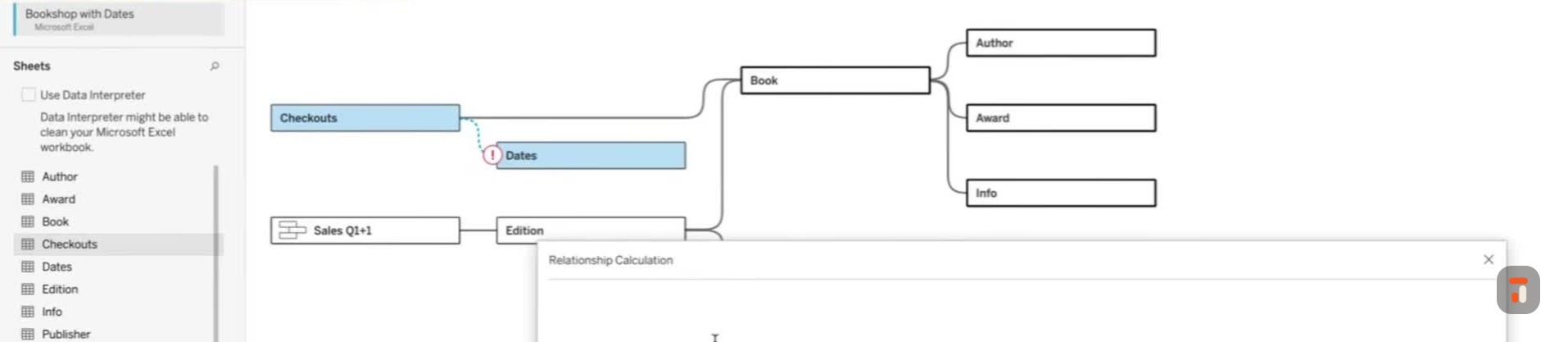
51:49So we'll come here just to remind people that on checkouts that
51:53We have this weird um the data's aggregated.
51:56So imagine some third parties controlling this force and they send us
52:01date at the end of the month, right?
52:02Yeah.
52:03Um whereas this tables every sale.
52:05So we would have to do you already showed how to do a join calc.
52:09We here we just create a relationship calc.
52:11So what I want to do on this relationship is I want to do a, I always wrap these in dates because I don't think I do for it, this one.
52:20So I'm going to do a make date.
52:22of we follow this out the years 2093 again we could always blow this out if people don't remember what they are but um the make date is year month day right so i'm gonna put then checkout month
52:35And I'm just gonna put on the first of the month.
52:38Because we don't know the level of aggregation.
52:40We just know it's at the month.
52:41So I'm just gonna show checkout month to a date
52:44Basically.
52:45And then on the other side from my date field, I also have to do a calculation, which is I think
52:52Some dates Tableau converts to a date time, so I just make sure by doing the that transactions.
52:59Yeah, yeah.
52:59Yeah.
53:00And this is sales date, I think it's called, isn't it?
53:02What's it called?
53:02Date.
53:03Um
53:04Oh no, sorry, it's date.
53:05It's my dates table.
53:06And then I need another.
53:08So basically I'm saying trunk it to the start of the date.
53:11To the start of the month.
53:13And then I don't have to do that with this one is what's kind of cool.
53:17Is on this one, I can just go and again see the i Tableau didn't know, even though they're both dates, because they don't they don't have a different
53:24They have a different name.
53:25One sales date and one's date.
53:27So double click thing's not super smart, but that's okay.
53:30It just it has to match exactly.
53:32So makes sense.
53:34So now that we have this model, we can answer a lot of questions, right?
53:38So I always think about you know
53:41Data science data analysis, you should always start with questions, you know, but I'm more of an analyst than a data viz person, you know.
53:47Right?
53:48So um
53:49I think a lot about um, you know, questions like how many books have we sold?
53:53So you started to show this a little, but let's start
53:58Uh oh, it's because I had as an extra.
54:00Okay, that's fine.
54:01So um how many books have we sold?
54:03I'm the exact same as you.
54:04People are gonna grab title, right?
54:06So if we grab our book title, this is the exact same thing you showed.
54:10One interesting thing right away is
54:12On a join, what we might have to do to know if that's one-to-one.
54:18Um, you'll notice down here I've got like that's got
54:2158 marks, a little small, maybe begin highlight that um and then what we see though is we might do this
54:29and try to figure out, you know, how many or count distinct it like you did.
54:33But we don't need to even do that here.
54:36What we do is we count the rows from the same table.
54:39We're gonna see they're all unique because if two books had the same name, it would show a two there because there'd be two rows of it.
54:46I see.
54:47So it also works for that, right?
54:49Okay.
54:50I think it's pretty slick.
54:51That's pretty slick, yeah
54:53Yeah, but if we want to answer how many books have we s sold, all we have to do because remember every sale is a
55:01is a row in the sales one, is we just bring this out.
55:06I could I could of course do it like you and get the bird, right?
55:09But the neat thing about this is if we sort it the other way
55:12It w there's actually two books in our in our library that have never sold before.
55:18Right?
55:18And Tableau will automatically take the nulls it gets on that j on that join.
55:23It effectively did a left or right join.
55:26I guess it's a left join, right?
55:27But um to get and then it says, well I'm missing two records, so I'm just gonna take those nulls and fill them with zeros.
55:34If we had done a join
55:36Um we would have gotten one here because there would have been one row for them, if you know what I mean.
55:42Or zero if we did an interjoin.
55:43Oh sorry, not that they wouldn't show up if we did an interjoin, right?
55:46Yeah.
55:47It's very powerful that
55:48Yeah.
55:49Um that's why I always say without sounding too like uh slogany, but it's you get more answers with less data.
55:57And the reason there's less data
55:59is we haven't exploded any of these tables, right?
56:03Um that I can control any answer depending on which field I bring into the view.
56:09Right.
56:09So that's kind of a simple example.
56:12Um and it's really intrusive actually.
56:15Yeah, like once you kinda r wrap your head around it, right?
56:19So if we looked at
56:20Let's say we wanted to know our top-selling books by genre and author.
56:26And one thing I should do is I should um
56:29keep this view data model going the whole time.
56:31So this is kind of a new slick modal dialog box.
56:35I know you showed this off in your new features.
56:37Um where is but if you pick this, I can't pick it yet because I haven't pulled anything on, but watch is like pull them on, um it'll sh it'll um it'll show me some things, right?
56:47So what did I say?
56:47I want to know top selling books.
56:50So that's book title.
56:52Right.
56:52And then I can go like this and you'll see uh table is only pulling in from that um cable.
57:00Um and then if I want to know by genre comes from info, so I could say
57:05Um by the way, I only got this one because when I pulled it off and pulled it back on, you get these weird kind of things.
57:12But um if I do that, what happens and and then I can drag it here, right?
57:16Um I got my genre, then book, and then
57:19You'll see it as this and then um and then I want author name so I could do something like this and just go
57:28create combined field and now we got first and last name before we have done that already.
57:33Right.
57:33So just a quick instead of writing a calculation.
57:36Right.
57:36Yeah.
57:37Um
57:38Although it's interesting it didn't pull in.
57:40You see it's a new feature.
57:42Well I if I pulled in last name.
57:44Yeah, and interesting it didn't show up.
57:46Let's just do last name for simplicity so the model works.
57:52That's kind of neat.
57:53So what's going on here is that it Tableau doesn't interjoin across all these.
57:58If we get this window a little bit out of the way, it doesn't interjoin on all these.
58:02Because it kind of makes sense.
58:04So at this point, if we have a book um that say hasn't sold, or an author that doesn't have a book, or
58:12It'll only show us the intersection.
58:14But as we start bringing in, and that's because the heuristic, like I mentioned earlier, is if there's only dimensions that's interjoins, any
58:22measure, including the pre-calculated tableau ones for the row count, um tableau will then auto-join to it.
58:29So if we wanted to know
58:31On sales, remember we asked sales, so we just take the sales count.
58:35I didn't even create this calculation.
58:36It's just a count of um
58:39Well to count a rows, otherwise I would actually have to do item ID order ID as a combined field in this data set.
58:45So it's slick that these are pre-built, right?
58:47So again, just to keep if I go like that
58:51Again, you'll notice that in our data model now the sales table came in, right?
58:57Which is slick.
58:58And you'll notice that this book, The Deep Gray, by um
59:04By Molowski should be back here too, the deep gray didn't sell.
59:08See that modal changes too, which is like right as you go sheet to sheet.
59:13Yeah, so it even it even figures that out, right?
59:16So we could again search this way.
59:18You'll see people who didn't sell a book.
59:21But where this gets really powerful, and I don't think most people know this exists, is let's say I wanted to um to answer
59:30Uh I've got it down here, but imagine here uh all of a sudden I wanted to know, and I'm inquisitive like this, I know as you are uh if I randomly said all of a sudden, well I wonder what authors we have who haven't sold a book.
59:43So
59:43When I had data modeling with Tableau published on Amazon, they put on my author profile like months ahead of the book, which I found weird.
59:51Um, because I was an author without a book, so it actually happened, right?
59:56If I take a measure from author table, remember author whether there's author on here or not, there's last name on here, if I take author count and say throw it to detail, or I could throw it to text.
60:08It'll give me also all my authors who haven't had a book and therefore of course they don't have a genre because they don't have a book, right?
60:17Uh which is really slick, right?
60:19And of course we could always edit that alias to blank.
60:23Right.
60:24Same thing here.
60:25So that's really powerful because you would never or hopefully people wouldn't do left um
60:30full odor joins all over the place.
60:32Because the amount of nulls you would get would be crazy.
60:34So this way, there's no nulls on my data unless I force Tableau
60:39to ask for something where a null exists, which I think is really neat, right?
60:43So here are my authors randomly I get to ask that question um against that.
60:49So
60:50Does that make sense so far?
60:52Yeah, so it's kind of a neat uh heuristic.
60:56If we go back to our data model, just the last question, you'll notice this
61:00It's pretty funny, you have to be on a sheet.
61:02Um I'll open that up again in a second.
61:04Is this is where uh multifact becomes so powerful because
61:09Uh again, like I said, I might want to answer, you know, by customer, you know, one are sales volumes by relative to, you know, how often they call our call center or something.
61:19Right.
61:19Like
61:20is tricky to do unless you do this.
61:21And this is why I love this bookstore model, is I um should be able to answer questions like, I wonder
61:29What are sales relative to checkouts are?
61:32Imagine if you're at Amazon, are we selling more books or are we uh, you know, are people doing them on Audible, Kindle Unlimited, whatever we want to do?
61:39So
61:40What's neat about this, and it's the a really powerful kind of query tableau uh does now, um, is that's a really simple calc.
61:50So I probably already have it in here is the
61:53Um so let me recreate this.
61:56So if we wanted to create a calculator field called sales to checkout ratio, what we could do is we could take the count of sales just like that
62:07then we could divide it by um you know the sum of our because remember we can't um on checkouts we can't count rows yeah because they're aggregated to the month level to
62:21We actually want the number of check outs.
62:23Right.
62:23Now, let's see.
62:25The only trick about this is, so this is good, but this is what I meant earlier too when I said you don't need to know how to write SQL to use Tableau, but you should understand your data.
62:33to use Sello right is.
62:36If we bring this on, right, we get um the average is four point one, which tells us something.
62:42But I hung that data
62:44If I pulled date out now and I made date at the um continuous month level, for example, there's a ratio over time.
62:54Right.
62:56We can't come lower grain than this because remember we only have so you have to kind of know that.
63:02Yes.
63:02But it will let you go down.
63:04Yeah.
63:05Yeah.
63:06But that number will be misleading now, because again, um it's kind of pegged to the month level and it's just spreading out through the month.
63:13Yeah.
63:13Is that what it's doing when you do to the to the week?
63:16It's well
63:17Yeah, we would have to look at that.
63:19We could we could look at a table and break it down.
63:21The ch the challenge is yes, it's gonna what it's actually gonna do because it's a day trunk.
63:26is it's going to compare the week of sales to the month that it's because we did right?
63:33Yeah, yeah, yeah.
63:34Because again, like we talked about earlier
63:37Uh tables are right or wrong, right?
63:39But philosophically, things you're smart, it's not their job to stop you from doing something like that.
63:44Yeah, yeah.
63:45Right.
63:45I think a really a really useful feature we should tell Thomas this is
63:50When you make a sheet like this and there's a contextual like calculation or thing that you wrote back in the data model window
64:00For it to show that here when you're building this because that's that's that's sometimes you can be building this very removed from when you build the data model and hiding and showing this relationship.
64:10is as I guess one part of that.
64:12But I think what you said there, I remember we did we'd we're recording this.
64:15We did this roughly an hour and a half ago.
64:18Yeah.
64:19And actually in that time I would have forgotten.
64:22But as an analyst that might have been
64:24last week or yesterday or three days ago.
64:26Now I'm sitting here going, why won't this view work?
64:29Oh, it's because we date the the thing.
64:31Right.
64:32So
64:32Really nice to have a call out here that says, hey, let's let's do this.
64:36So Thomas, if you're watching, uh add it in.
64:40That's one ad for sure.
64:41I will show you what they have done.
64:43Remember this when we come back here and highlight that.
64:45Yeah
64:46You'll see that edition and publisher aren't highlighted, right?
64:49Uh but but everything is here.
64:51If we come back and we said, well I you know, I would like to break this down by addition or something, right?
64:57And I took addition
64:59And went, let's break it down by format or something.
65:02So I go to put format on color.
65:04What it does do is it does warn me here
65:08Right?
65:08That it can't break it down because and if I had them on independently it would say that because it's not related.
65:17So you have to be careful, it'll warn you here.
65:20For sure.
65:21When you hovered over it, it warns you there, right?
65:24Can you see if you hover over the checkouts?
65:26Um yeah, it'll tell you up here too.
65:28It'll tell you everywhere.
65:29Yeah, yeah.
65:33Um
65:33Because one of them can't be broken down by format, right?
65:36And up here it'll tell you it stitches together, which we should get back to how it stitches them together.
65:43So it will warn you about that.
65:45So I think it will get better, right?
65:47The other thing I think we can expect to see in that
65:51little pop-up window is the fields that are causing whatever to happen.
65:54And hopefully maybe inner join, interjoin, outer join.
65:57Hopefully.
65:58So um people even
66:00even get to that.
66:01One thing I didn't show that you reminded me I should have showed is if if you do notice though what they're also pretty smart about is um
66:08If we said, let's just look at um number of checkouts, you'll notice addition and publisher gray out.
66:15Yes.
66:16Because it is no way to connect to them.
66:18So but again, it's tableau, so it's not going to stop me
66:22And it'll just give you the screen.
66:25But it it they are getting better at queuing than they used to be for sure.
66:29But you had a good point about
66:30When I bring that down, it should be smart enough to tell me, hey, I can't I can't get to that level of grain on one of the two tables.
66:39But what the last thing I should show is what's going on here, then I I think we can I think we've been through it all, which is awesome, is if I took anything that is common between them
66:49Like say, um, well, since we kept going back to genre, if we took that on color, because maybe a product manager wanted to know um
66:58Why would I be getting nulls?
67:00I'd have to think about that first.
67:02Um but if we we shouldn't be getting it on
67:06But uh we could think about anything.
67:08You could break it down by anything, right?
67:09You could break it down by the author's birthday if you wanted to, right?
67:12Or we could use hours writing per day.
67:14Anyway, I'll go back to that and we'll think about, you know, because it always happens in a demo when I take that.
67:19Yeah.
67:20When I take unusual things happen.
67:22Uh genre.
67:23We look at why.
67:25Um, it could be, sorry, that um one genre never got checked out, but um
67:31Uh if we broke them down individually it would show up but what what Tableau is actually doing here to create these, but we'll see for whatever reason people don't like checking out mystery books, right?
67:41They like uh buying mystery books and yeah, you know they
67:45But nonfiction, I guess, makes sense.
67:47You know what I mean?
67:48I'm not gonna go back to it or whatever.
67:49So kind of slick, right?
67:51That you can actually see these in the data, although it bounces up here.
67:54Again, too many colors there, but you get the idea.
67:56So um but what Tableau does here
67:59when they're two uh when there's two base tables is it actually it aggregates to the level of both base tables
68:08It brings in whatever dimensions you break it down by.
68:11Again, we could, of course, put that on a filter instead, right?
68:15So let's say we only want to see children's or something.
68:17It what it does is it
68:19It passes that to both, right?
68:21It brings back the aggregated results from each table, and then it stitches that together in the view.
68:27So it's really powerful because
68:29You effectively to do that join um in old school would be really difficult because what would have to do we would we'd somehow have to find a way
68:39to aggregate up that sales table first before we joined it to the other table because you can't join tables like that at different levels of aggregation.
68:47So in this it's not doing this.
68:49There's actually
68:50two completely independent SQL queries being run and then in memory on this view tableau stitching the results together.
68:57So that's why
68:59Um, these multi-fact relationships are so powerful.
69:03And, you know, in the end, why we said before multi-fact, it didn't really matter what order these went in.
69:09Now I'm saying
69:10put these and again these would be the center of a star schema um if you know if it was in other products that model star schema
69:18And then these are these would be what would be called shared or conformed dimensions, depending on what they were.
69:25So, but again, this model becomes really powerful because I can
69:29You know, I can break down award as an example by like almost anything here, right?
69:35Or pick it, you know what I mean?
69:37So I know I go, I can say which awards had books checked out the most, or which award had sales, or what's the ratio between sales and
69:43by award.
69:43I could have done that by award, right?
69:45So it's pretty pretty powerful stuff when you know what Tableau's um generating.
69:50And I would say like so much about Tableau, it's um
69:55It's like kind of quick and easy to understand it, but not intuitive unless someone tells you.
69:59So it's kind of a recurring theme, right?
70:02You said something very quickly there.
70:04I just want to sort of double click on or drill down on to borrow tablets.
70:08Um
70:10You said it does it in memory.
70:13Is it fair to say then that the Tableau's data model is also a little bit kinder on your database because it's not
70:21asking the database to do all this work.
70:23It's basically saying, hey, you summarize that table, you summarize that table, send them to me, and I'll do the job of bringing them together.
70:31Which in itself inherently means that
70:34the database isn't having to do both of those pieces of work.
70:37Is that a fair like Yeah, that's a kind of point.
70:40It's a great point to it's a great point to bring up
70:43And in the world of um paying I guess you technically always pay for queries, whether it's Snowflake, yes.
70:51You're trading it off.
70:52You could literally pay like Snowflake.
70:54It's one less query, I guess.
70:55It matches.
70:55Yeah, but even against SQL Server you're
70:57Then people are right.
70:59So but definitely in Snowflake you're actually paying or other products like that.
71:02If you extract this, remember Tableau's taking snapshots of each one of these tables.
71:07Table.
71:07It's not doing any processing.
71:09And then at runtime it's also doing all the joins, writing SQL against its own hyper database.
71:15And at least today, Tableau Classic doesn't um
71:20doesn't charge for compute.
71:22So talk about a good way to bring your Sounds like you know something's coming, Kek.
71:26Well, no no.
71:28Well t sorry, Tableau
71:30next uses data cloud and part of that charges for compute.
71:33That's all I meant, sorry.
71:34So um but but you know it's n traditionally
71:38Tableau OG classic, whatever we want to call it, core doesn't.
71:44No no, I don't know.
71:45I definitely don't know anything.
71:47Don't anyone read into that?
71:48It's just data cloud for stuff you move in a data cloud church.
71:51Yeah, yeah.
71:52Right.
71:52That that's that's what I understood as well.
71:54That's good.
71:54So that's it.
71:54It's even gonna be complex in Tableau Next, because if you
71:57Make a zero copy reference, then it doesn't charge for computer.
72:00So that one's gonna be exactly Will you do a video on that in three months' time?
72:03Oh god, yeah.
72:04That's another world.
72:05So this is so this is like there's a lot of depth.
72:08I mean, um I'm gonna have to edit this video and figure out how long have we been going for the point you'll be watching this uh as an audience, right?
72:15So there is a lot of depth to this.
72:16And this whole time
72:18I think one of the things I've said to you, and I've said to um Paul Eklund at Tableau as well, is that when you're building the data model
72:27What we've done here is probably the equivalent of maybe two to three works of working on a problem.
72:35bringing your data sources in, iterating on it a little bit as you go back and forth within the business.
72:40And therefore it's it it it's potentially unlikely that you'll ever build a model like this out of the gate.
72:46It's unlikely that you'll sit and build this
72:48sort of really complex illustrious model out of the gate.
72:51Instead what you need to do is come to this from a mindset of um
72:56Let's say long-term development where you build this model, and the next time you get another question that can be answered by this model, you don't start again, you actually find this model.
73:07and work on it, which then leads into this sort of world of composable data sources where actually we need to decouple
73:15our published data sources from our workbooks and have them be sort of slightly more standalone assets with more thought-through data models like this or like other examples that you might build in your business.
73:30So we can actually do this iteration in real time because otherwise you end up in a scenario where it makes no sense to do all this work uh in in one model if every time you're gonna start again.
73:43Great.
73:43So yeah, the only two reasons, by the way, I I even think compose composable data sources I'm not as excited about, I think, as other people.
73:51No, I'm excited about, but is because
73:54The only two use cases for them is if you have to use Tableau Prep and then because this won't let you go grab a table out of hyper only to publish data source, which isn't they could have fixed that another way.
74:05Um the the only composable data source one is if you don't own the original data source and you can't edit it and Excel file or something like that, right?
74:14But what's great about this is if you don't monkey with the performance options
74:18Right, because that could affect us too.
74:20Um what's great about this is imagine we had not only this workbook, but this is a published data source, and we don't know there's like loads of workbooks potentially using it.
74:30We can keep adding tables to this and it will not mess up those workbooks.
74:35Correct.
74:35Because this thing's always additive, like flexible that way.
74:40Right.
74:40Which whereas if we joined a table and did the wrong kind of joining, we could unintentionally like give wrong answers across the entire organization.
74:49If that was in a published data model.
74:51Right.
74:52And the other thing about this is
74:54Everyone's so hyped up about AI right now and for good reason, right?
74:58But but AI's really only a smarter
75:02or different way of doing what technology always did, which was let me simplify things.
75:08This to me would be like in the past
75:11Um again, if I wasn't a data engineer, but I understood my data, I might literally draw something that looked like this on a piece of paper, but I would have to hand it to a data engineer.
75:20Now what I do
75:22is I I d draw it on this canvas, literally canvas, and and Pableau is effectively my data engineer for me, right?
75:31Like, and so
75:33It's pretty like again, I I can build this without knowing a lick about SQL, but again, have to know my data well.
75:40And Tableau handles all that for me.
75:43Yeah, it's pretty powerful.
75:46It's a lot of uh obfuscation of complexity for for good reasons, right?
75:51Like it's it's it's
75:53It's allows you to just focus on the thing you're trying to answer.
75:56And I I found this approach has also got me thinking more about um
76:02Not just the type of question I'm trying to answer, but I actually pay more attention to each of these tables.
76:07I think in the in the past there was this sort of
76:10uh, let's say, desire to simplify your table so that you could join them.
76:15So you could get the sweet
76:18sort of model or the sweet physical table as we'd call it today, just to answer that specific uh problem.
76:25And you'd kind of deal with that task, you'd move on.
76:28This gets me thinking about each of these tables in their own respect.
76:32So I understand the book table as a standalone item, the author table, the award table.
76:37And that builds a deeper intuitive understanding.
76:39of your data model because you inherently a lot of the context we talked about, we knew we couldn't go from here to here without X.
76:46That is actually the job of a data analyst in some way or form, is you know, being able to curate these data sources and knowing inherently
76:54what you can and can't do with them.
76:55So th th this this approach is also more true to form of of how we should all be working with data, not just as you know visualization or data analysts or data engineers, whatever you want to call yourself.
77:06just as stewards of good data, this is a much better way of thinking about your data and sort of building those through.
77:13Yeah.
77:15Yeah, definitely.
77:16Like a hundred percent on that cause each one of these I could like I don't know if she word it this way, but if I could channel like
77:24Bethany Lyons a little bit, right?
77:26She would say each one of these has analytical value on its own.
77:30Correct.
77:31Or in combination with any of the other things, they needn't be all brought together to have
77:37Analytical value.
77:38Like I might just want to answer a question about how many books we have.
77:42And I don't have to run against a great big wide table.
77:46To answer such a simple question, right?
77:48Like what's your count distinct example?
77:50Yeah, yeah.
77:51And I think uh but maybe the last point here is um I I I caught your your conference session at um
77:59at San Diego Tableau Conference and um I was I was I was I was in the session towards the very end and you showed this incredible diagram.
78:07of how m how optimized something like a data model can be versus the um SQL sort of equivalent, right?
78:16For fun
78:18fun, 'cause you can tell what my life is when this is fun.
78:21Uh I wanted to challenge myself to see if I could even
78:26um build this model with join.
78:28So this is the exact model we're looking at.
78:30And I've had this question for years from people actually, which is um how many rows is too much for Tableau?
78:38And I'm like, that's not the right
78:41question to ask because I've had um I've had uh a data model like seven years ago on an old Mac at the time with one point three billion rows and I was answering anything I wanted to in
78:51two two seconds or less because the m because it wasn't very wide.
78:55Right.
78:56So I always tell people, think about it like almost like an Excel sheet
79:00where there's the number of cells on it.
79:02So it's the number of rows multiplied by the number of columns.
79:06So because each of these tables comes into Tableau in a relationship model
79:10I see.
79:13You multiply them together and then you add up the results.
79:16So this thing has thirty
79:18Three hundred just under four hundred thousand cells.
79:20And then it took me a while to do this because I couldn't do it a union, because remember our data, because checkouts, um
79:28Because sales don't have book IDs in them and checkouts don't have editions in them, so there's no way to union them to get them to go.
79:37So I had to do this model, and when you multiply all these together effectively, right, or you multiply your number of fields by number, uh like number of rows you get with this mess, you get
79:4829 minutes out.
79:51And the calculation's way more complicated to do.
79:54Yes.
79:55Um, which I showed in the TC presentation.
79:58But even without that, um, it's basically this, right?
80:01It's like a thumbpoint.
80:02Like that data model's one point three times the size.
80:05And
80:05It can answer more questions because this has a lot of inner joins taking things out of the date.
80:11Like this model doesn't know about those seven authors that didn't sell a book.
80:15So this actually is less answers, even though it's
80:19No, right.
80:20Literally two orders of magnitude bigger.
80:22Do you know what I mean?
80:23It's almost a hundred times bigger, right?
80:25Yeah.
80:26Yeah.
80:26Yeah.
80:26Yeah.
80:27I thought that's a really profound point.
80:28I that's why I wanted to call it out because
80:31Um like if you if you don't care about anything else, I think this is probably the number one reason you should care about it because this is just being done for you.
80:39This is just like an optimization in the background for free
80:42Depends on what you build, right?
80:43And it and it's just right there for you.
80:45And I think another interesting thing I've just seen, I was that I've just realized you went and took the screenshots of the little window that we sh we looked at earlier.
80:52to say three fields sixty six rows and you've put this in there.
80:55I this whole time I was about to ask you, how on earth did you get these little uh labels to say how
81:01Yeah yeah.
81:02It's that little screenshot from that screen.
81:06Oh and these are all screenshots too, right?
81:08Yeah.
81:09I'm I'm thinking Thomas, add the screenshot in.
81:11Come on, Mike.
81:14Because I think it's it's a bit like uh building a flow in prep or uh altrix, whatever, right?
81:19Like you get to see what's happening at each step.
81:23And actually what would be interesting here is as you click on the sales model
81:27seeing that number change depending on which of the modders you've selected, I think would also be um quite useful because you inherently you you'd essentially get zero um
81:37You'd get you'd get you'd get the number changing to show you the context of what what tableau would be processing.
81:42So it would make this model almost come to life in real in in real terms.
81:46Right.
81:46I think that would be really quite cool.
81:48But anyway, we digress.
81:51Right, Kirk, we've been going for a long, long time.
81:54I think we have covered everything we could possibly want to cover, at least as of 25-1.
82:00Of course what happens now is something comes out in 25 2 and we're like, oh god damn it.
82:05Let's add an addendum.
82:09So what I what I will do is I will call out this
82:11This is the this is the first time I've ever done something like this, and I think this has been really great.
82:17If we have any additional notes that we want to add to this video,
82:21We will do so in the description and in the comments.
82:24The first uh pinned comment and in the description we'll add any sort of additional notes.
82:29All the resources are also there, so you can also check them out.
82:32But yeah, I just wanted to call that out in case something changes
82:35And it's just gonna save us this effort of having to reshoot the whole thing.
82:41So really appreciate it.
82:42Uh uh what did you learn today, Kek?
82:44I was gonna I was gonna ask you this 'cause uh obviously uh you were you were mostly teaching me, but I wonder do you did you learn anything about
82:50About the way I'm working or the way I'm thinking about this, that's the sort of different Yeah.
82:56No, I think uh
82:57It's always good to learn people who use Tableau a lot, you know, clearly an expert like yourself, think about it.
83:04Like I I learn every time and
83:07Um, and it's good to see that because what it helps me do a lot is get better at explaining it, knowing because lots of times um
83:16The worst thing for me is in life is the curse of knowledge.
83:20It's so easy to think that people know what you know.
83:23Do you like and so it's it's always good to see they're even little things, but they're little tips and tricks.
83:29I almost feel like
83:31It took three years, but I got to the point where I could almost do like uh cool things to do in the Tableau data mobs that people have now.
83:38Right.
83:38Like yeah.
83:39But you've built that you've done that in public.
83:41That's why I think people come to you because you've you've you've
83:44Um you've been in our feed multiple times to like and and you still continue to even after you've done multiple conference sessions and you're learning more, you're continuing to discover these
83:54these things and you are essentially going into a different depth of understanding almost on behalf of the community and it's really it's really valuable resource.
84:02This is why I wanted you on the channel because I felt like
84:04I could try and do a video about this, but actually I think this discussion and us talking about it was a much more useful way of showing how to learn about this because this is how you'd learn in an office, right?
84:14Um working together, you'd come over my shoulder and you'd explain it to me and
84:18This working knowledge is actually more useful than just reading the documentation or watching a tutorial from me where I step you through the functional steps, but actually
84:27The working understanding is completely different.
84:29So I think it's been a good format.
84:31So Kirk, what did you enjoy the most as well about this experience?
84:34Um
84:35Yeah, well I think I enjoyed the most about it is um that I was flattered with your first collaboration, but more than that, what I enjoyed the most is I was the first person other than you that got to say let's get stuck in
84:48You know, I knew you'd love that moment.
84:51I I should get that on a s on a t-shirt or something and get a like a like a limited edition run of tablets and t-shirts with let's get stuck in on the left.
85:01Hold that thought.
85:02Hold that thought.
85:05I totally loved it.
85:06I I I you know that that phrase is uh is a is a uh it's a funny part of the brand, right?
85:12Something I just started saying and then
85:14I just realized ah this this has just become like a part of the thing and it doesn't sound right without me doing it.
85:19Handing that over to you is like a um it's like an honor in many ways because it's I I uh this is very much you sort of teaching the community and me
85:27So in this case it didn't feel right for me to say that.
85:30You're the one sort of taking us through this.
85:32So that's why I handed you the honors.
85:34And I think you'd enjoyed it as well, so which you did.
85:36So definitely flattered.
85:38It's also a uh
85:39It's extra fun 'cause it's such a kind of British expression, which makes it even more fun.
85:44It is you do need the British stuff like the thing the thing.
85:49Uh yeah, what's the best uh sort of
85:52part of Britain to say that word.
85:54I think it has to be the I think Scottish, the Scottish way of saying it would be the would probably be the most truest form of that phrase.
86:01So
86:01I'll try and see if I can find an AI to say it in in the appropriate way.
86:06With the last name of Monroe, you think I'd have a better Scottish text in first.
86:10I was gonna say that's a great chat.
86:13Well, thank you.
86:14Thank you for joining me, Kirk.
86:15I think it's been fantastic.
86:16And you're the first person ever to collab on a video virtually.
86:20So um I have a long editor ahead of me
86:23Uh but I think this is this is gonna be a really special video.
86:26Um uh if you think the same, let us know in the comments.
86:29Once again, I encourage you to
86:31Share this with your colleagues, share this in the community, and give us feedback in the comments below.
86:36Ask questions.
86:37We love to see those questions as well.
86:39This will be changing.
86:40But hopefully we've built a really useful resource.
86:42that you can go away with and you can say, I now understand how the data model works.
86:47I'm gonna start using it.
86:50Perfect.
Future-proof your career https://n1d.io
| Sign up to Playfair+ http://bit.ly/4lgOeio - Discount code: TableauTim - Good for 10% discount at checkout. [ Affiliate Link ]
- My Courses on Linkedin Learning: https://www.linkedin.com/learning/instructors/tim-ngwena
Boost your skills with DataCamp’s comprehensive, hands on Tableau courses https://datacamp.pxf.io/XmLyDo - [ Affiliate Link ]
The data set: https://help.tableau.com/current/pro/desktop/en-us/bookshop_data.htm
Join me in this special episode of Data Model Masterclass alongside Kirk Munroe, as we dive deep into the intricacies of Tableau’s data modelling. In this session, we guide you through everything from the basics to advanced tips, ensuring by the end, you’ll confidently use the data model. We’ll cover the connection window, logical vs physical data models, performance options, and even explore Tableau’s unique approach to intuitive data structuring. If you find this video useful, please subscribe and share with your colleagues. Let’s get stuck in!
00:00 Introduction and Special Guest Announcement
00:26 Overview of the Data Model Masterclass
01:07 Getting Started with Tableau and Bookshop Data
02:45 Building the Data Model: Relationships and Connections
04:21 Advanced Data Modeling Techniques
06:04 Exploring Data and Creating Joins
12:22 Union and Physical vs Logical Tables
14:47 Physical and logical models
17:20 Finalizing the Data Model
37:20 Navigating Tableau’s Interface and Extracts
45:25 Optimizing Tableau Calculations
46:06 Understanding Data Models in Tableau
47:41 Multifact analysis
47:41 Building and Comparing Data Models
49:00 Advanced Data Relationships
50:36 Practical Applications and Examples
53:34 Exploring Tableau’s Heuristics
56:19 Real-World Use Cases and Best Practices
01:10:02 Kind on your Database
01:12:08 Final Thoughts and Future Directions
Join this channel to get access to perks:
https://www.youtube.com/channel/UC7HYxRWmaNlJux-X7rNLZyw/join
#tableau #salesforce #analytics #data
Follow me on Twitter: https://twitter.com/TableauTim
My recording gear & what’s on my desk. https://kit.co/TableauTim/desk-setup
My website: https://www.tableautim.com/
My Screen Annotation Tool: https://j.mp/3HWc4Mj
My technology Channel: https://j.mp/3F0d28f
Share feedback and Suggestions: https://tableautim.canny.io/suggestions
(C) 2023 TN-Media LTD. No re-use, unauthorized use, or redistribution, of this video without prior permission.